
TL;DR: Use refactor when you clearly understand the scope of the code that needs refactoring or need a quick localized cleanup. Choose refactor-plan when you are unfamiliar with the codebase and cannot easily assess the blast radius of your changes.
Introduction
“Refactoring” is both a technical term and a task with highly variable boundaries.
When we tell a Large Language Model (LLM), “Please refactor my code,” the actual intent could be:
- A localized refactoring of a specific class, function, method, or variable.
- Reassigning responsibilities across multiple classes or configuration files within a module.
- A systemic architectural overhaul because the current code organization has become unmaintainable.
The first scenario might just involve splitting an 80-line function into three smaller ones. The second could mean realigning module boundaries across 20 files. The third could require architectural adjustments affecting almost the entire application.
Different scopes require completely different refactoring strategies. Using the wrong approach can expose developers to unexpected risks.
Let me emphasize this again:
Refactoring is NOT rewriting.
As Martin Fowler clearly states in his book Refactoring: Refactoring is a disciplined technique for restructuring an existing body of code, altering its internal structure without changing its external behavior. Rewriting is starting from scratch.
Most tragedies caused by refactoring happen because developers approach it with a “rewriting” mindset. Initially, it feels like modifying just a few lines of code. But things rarely go as smoothly as planned. As related changes pile up, the original problem remains unsolved, and a host of new bugs are introduced. The worst part? Proceeding without adequate test coverage.
Today, with the rise of AI Coding, an increasing amount of code is generated by LLMs. When 80-90% of a codebase is AI-generated, attempting to refactor it without a scientific, structured approach will lead to disastrous results.
In this post, I will share two distinct refactoring skills to help you choose the right one when your code needs a cleanup.
The Two Skills Compared
refactor
npx skills add https://github.com/github/awesome-copilot --skill refactorIn the documentation for this skill, there is a very explicit statement about its scope:
Improve code structure and readability without changing external behavior. Refactoring is gradual evolution, not revolution. Use this skill for improving existing code, not rewriting from scratch.
This skill is designed for the gradual evolution of existing code. If you’re looking for a massive overhaul or a complete rewrite, this is not the tool for you.
Reading further into the SKILL.md file, the author clearly outlines the triggers in the “When to use” section:
Use this skill when:
- Code is hard to understand or maintain
- Functions/classes are too large
- Code smells need addressing
- Adding features is difficult due to code structure
- User asks “clean up this code”, “refactor this”, “improve this”
These conditions indicate that the optimal time to use this skill is when the user knows exactly which class or function has degraded to the point of needing immediate attention.
When we continuously iterate on code using AI without strong architectural guidelines, we can easily accumulate large blocks of redundant or even dead code. Using the refactor skill to inspect specific files and sniff out bad code smells is a smart move.
Principles Before Refactoring
The refactor skill sets strict requirements for execution:
The Golden Rules
- Behavior is preserved - Refactoring doesn’t change what the code does, only how
- Small steps - Make tiny changes, test after each
- Version control is your friend - Commit before and after each safe state
- Tests are essential - Without tests, you’re not refactoring, you’re editing
- One thing at a time - Don’t mix refactoring with feature changes
Every single one of these rules stems from the painful lessons of countless developers. They embody the core philosophy of “scientific refactoring”:
With a firm commitment to preserving behavior, break the refactoring down into multiple small steps. Rely on version control to ensure you can roll back safely at any time, and use Test-Driven Development (TDD) principles to verify the code before and after each change.
10 Code Smells and Their Refactoring Philosophy
The reason the refactor skill is so highly regarded is that its SKILL.md lists 10 classic Code Smells.
Although LLMs have consumed vast amounts of excellent code during their training, explicitly pointing out code smells and providing the correct patterns helps the model output stable, high-quality refactored code.
Let’s break down these 10 bad smells. This won’t just help you understand what this skill does; it will deepen your fundamental understanding of code refactoring.
1. Long Method
The Smell: A function that is too long.
Example: A 200-line function that queries the database, cleans the data, performs business calculations, and sends notifications all in one place.
The Underlying Issue: The function has one name, but it hides six independent sub-tasks. Want to unit test just the “update inventory” logic? You can’t, because it’s deeply nested within those 200 lines.
Refactoring Strategy: Identify the stable boundaries of each sub-task—what are its inputs, outputs, and responsibilities? Turn these boundaries into function signatures. The internal implementation details then become discrete units that are easy to understand and test independently.
The key to splitting a long function isn’t hitting a specific line count; line count is just a symptom. The real test is whether you can describe what the function does in a single sentence. If your sentence requires “and,” “also,” or “plus,” it’s time to split it.
2. Duplicated Code
The Smell: The same code structure in multiple places.
Example: The exact same if-else logic appears in three different files, or a discount calculation formula is copy-pasted twice.
The Underlying Issue: Duplicated code is often the byproduct of a “make it work first, fix it later” mindset. When business rules change—say, “Silver member discount changes from 10% to 12%“—you have to hunt down and update every instance. Miss one, and you’ve shipped a bug.
Refactoring Strategy: Ask a fundamental question: Are these two pieces of code doing the exact same thing conceptually, or do they just look similar by coincidence? If it’s the former, extract the shared logic to a single, authoritative location and handle the differences via parameters. Extract Method is the most common approach; if the duplication spans class boundaries, you might need Extract Class or even a shared Domain Service. Fixing duplicated code is high priority because every duplicate increases the risk of omission during future updates.
3. Large Class/Module
The Smell: A class or module trying to do too much.
Example: A class with 50 methods, or a module stuffed with 20 files.
The Underlying Issue: A massive class usually means it has multiple reasons to change. It might handle user data, send emails, generate reports, and process payments simultaneously. These responsibilities are independent but tightly coupled. Every business change ripples through this class, risking unexpected side effects. This violates the Single Responsibility Principle (SRP): A class should have one, and only one, reason to change.
Refactoring Strategy: Perform a business-level “X-ray” on the class. Can its methods be grouped by the “actor” they serve? Do the email methods belong in an EmailService? Do the reporting methods belong in a ReportService? Once you identify these natural boundaries, use Extract Class to move the behavior. This process often exposes hidden dependencies between modules, helping you redraw cleaner architectural lines.
4. Long Parameter List
The Smell: Too many parameters in a function signature.
Example: A function requiring 7 or 8 arguments, making it incredibly easy for the caller to mess up the order.
The Underlying Issue: A long parameter list usually indicates one of two things: either the function is taking on orchestration duties it shouldn’t (it should be called at a higher level instead of gathering dependencies itself), or the parameters form an implicit data structure that hasn’t been formalized. It’s a nightmare for callers, who must assemble every piece of data just to make the call.
Refactoring Strategy: See if the parameters can be conceptually grouped. Can street, city, and country be encapsulated into an Address object? If grouping reveals that some parameters merely configure internal state, consider introducing a Parameter Object to bundle them, or use the Builder pattern to let callers construct the request step-by-step.
5. Feature Envy
The Smell: A method that is overly interested in the data of another class.
Example: A calculateDiscount method inside an Order class that accesses seven different fields of a User object.
The Underlying Issue: Data and behavior have drifted apart. The discount logic relies entirely on User data, but lives in Order. This means anyone reading the logic has to mentally switch to the Order context. If the core focus is User data, why isn’t it with the User?
Refactoring Strategy: Ask the crucial question: Whose data does this logic care about? If it relies heavily on another object’s fields, the logic belongs in that object. Keep data and the operations that act upon it together to minimize cross-boundary data fetching. Move Method is your friend here. Afterward, the caller just “asks” rather than “assembles”: order.calculateDiscount(user) is infinitely clearer than having the Order class fetch user.membershipLevel and user.accountAge to do the math itself.
6. Primitive Obsession
The Smell: Overusing built-in types for domain concepts.
Example: Using a string to represent an email address, phone number, or URL.
The Underlying Issue: The codebase is littered with “naked” types, forcing you to guess the business meaning from variable names or comments. The problem with sendEmail(to, subject, body) is the lack of runtime validation—an invalid string can be passed in without any compiler warnings.
Refactoring Strategy: Wrap distinct business concepts into their own types (e.g., an Email class). The class validates the format upon instantiation. Introducing new types isn’t over-engineering; when a concept appears repeatedly and has clear “valid vs. invalid” boundaries, it deserves its own type.
7. Magic Numbers/Strings
The Smell: Hardcoded literal values without explanation.
Example: if (user.status === 2), setTimeout(callback, 86400000), or discount = total * 0.15.
The Underlying Issue: Numbers and strings appear out of thin air. What is 86400000? You might know it’s milliseconds in a day, but the next developer has to stop and calculate it. Magic strings (type === 'admin') are equally dangerous—one typo introduces a silent bug, and the compiler can’t save you.
Refactoring Strategy: Give every magic value a name. const ONE_DAY_MS = 24 * 60 * 60 * 1000 doesn’t just look better; it makes the calculation explicit. Readers immediately know it represents “milliseconds in a day” without reverse-engineering the math. Introducing Enums (UserStatus.INACTIVE) makes comparisons searchable, refactorable, and compiler-safe.
8. Nested Conditionals
The Smell: Deeply indented if/else statements.
Example: A six-level deep if statement where readers must hold the entire context in their head and read inside-out.
The Underlying Issue: Nested conditionals reflect a “run only if all conditions are met” mindset. This makes sense while writing, but it’s a nightmare to read. “If not logged in, error; if not verified, error; if order invalid, error; else process order”—the deeper the nesting, the higher the cognitive load, and the easier it is to miss a branch.
Refactoring Strategy: Invert the logic to drastically improve readability. Use Guard Clauses to handle edge cases and return early. This makes each branch independent, linear, and easy to verify. if (!order) return { error: 'No order' } clearly states when the function bails. Taking it further, you can use Result/Either types to handle errors as return values rather than exceptions, keeping the “happy path” as the main visual flow.
9. Dead Code
The Smell: Code that is no longer executed.
Example: Commented-out old functions, or unused imports.
The Underlying Issue: Dead code causes two major problems. First, readers stumble upon it and waste mental energy wondering, “Is this kept here on purpose, or did someone forget to delete it?” Second, it increases the signal-to-noise ratio in the codebase, obscuring the actual business logic.
Refactoring Strategy: See it, delete it. Run your tests; if they pass, nobody was using it. If you ever need it again, that’s what Git history is for. The less code you have to maintain, the healthier the system.
10. Inappropriate Intimacy
The Smell: Classes that are overly intertwined.
Example: Deep chain calls like order.user.profile.address.street, where one class pierces through multiple layers of encapsulation to grab another object’s internal data.
The Underlying Issue: This violates the Law of Demeter—an object should only talk to its immediate neighbors, not reach across three layers to talk to a neighbor’s neighbor. The consequence is massive fragility. If the Address structure changes, every file referencing .user.profile.address.street breaks. If the User class drops the Profile field, the entire chain shatters. In large systems, this deep coupling is a slow, creeping rot.
Refactoring Strategy: Let objects manage their own data. Ask them for what you need. The caller should ask the Order for shipping information, rather than rummaging through the Order’s internal structure: order.getShippingAddress().
Beyond Code Smells, the SKILL.md also includes examples of introducing Design Patterns and a quick-reference cheat sheet for 18 refactoring operations.
Reading through the refactor skill’s documentation, you’ll find it an exceptionally clear and comprehensive guide for localized code refactoring.
However, it has its limits: if your refactoring spans multiple files, using this skill directly might cause issues, as it doesn’t instruct the LLM to research external dependencies first.
For best results, pair it with another skill: test-driven-development.
refactor-plan
npx skills add https://github.com/github/awesome-copilot --skill refactor-planThis skill comes from a completely different starting point: Research first, plan second, execute last. During the planning phase, editing files is strictly prohibited.
The SKILL.md document isn’t overly complex; in fact, it’s quite concise. What’s worth learning is how it guides the LLM to formulate a refactoring plan.
Six Core Planning Principles
Principle 1: Read-Only Planning Phase
Do not edit files while preparing the plan.
The first rule ensures that no files are modified while the plan is being drafted. This effectively prevents the model from recklessly altering code before the user confirms the approach or provides sufficient test coverage.
Principle 2: Deep Context Gathering
Search the codebase to understand the current state. Read enough implementation, tests, configuration, and docs to make the plan specific to the repository.
The second rule forces the model to read the project’s code, tests, configurations, and documentation before making a plan.
This is incredibly beneficial if the codebase is inherited or entirely AI-generated, as giving the model maximum context significantly boosts the success rate of the refactor. However, if you’re just refactoring a tiny snippet, this step will obviously consume a lot of unnecessary tokens.
Principle 3: Identify Blast Radius and Hidden Coupling
Identify affected files, ownership boundaries, dependencies, and likely hidden coupling.
This rule highlights the skill’s most powerful feature: forcing the model to map out affected files, responsibility boundaries, dependencies, and hidden couplings. By identifying these critical factors upfront, you know exactly what your regression tests need to cover, drastically reducing the risk of unexpected fallout.
Principle 4: Bottom-Up Safe Sequencing
Plan changes in a safe sequence. Prefer contracts and types first, then implementations, then callers, then tests, then cleanup.
Even after identifying dependencies, this rule dictates that the actual code changes must follow a “bottom-up” approach to ensure stability.
Principle 5: Phased Verification + Rollback Mechanisms
Include verification steps between phases and a final validation command. Include rollback or recovery steps for the riskiest phases.
The fifth rule instructs the model to bake mini-verifications between steps and establish rollback mechanisms for high-risk phases. This is crucial—there is nothing worse than botching a refactor, realizing the new code doesn’t work, and finding out you can’t easily revert to the old version.
Principle 6: Wait for User Confirmation
Stop after the plan and ask for confirmation before implementing.
This skill won’t just start tearing up your codebase once the plan is generated. It keeps the human in the loop, requiring explicit confirmation before any real refactoring begins.
The output of refactor-plan is a structured Markdown document that perfectly reflects the essence of this skill:
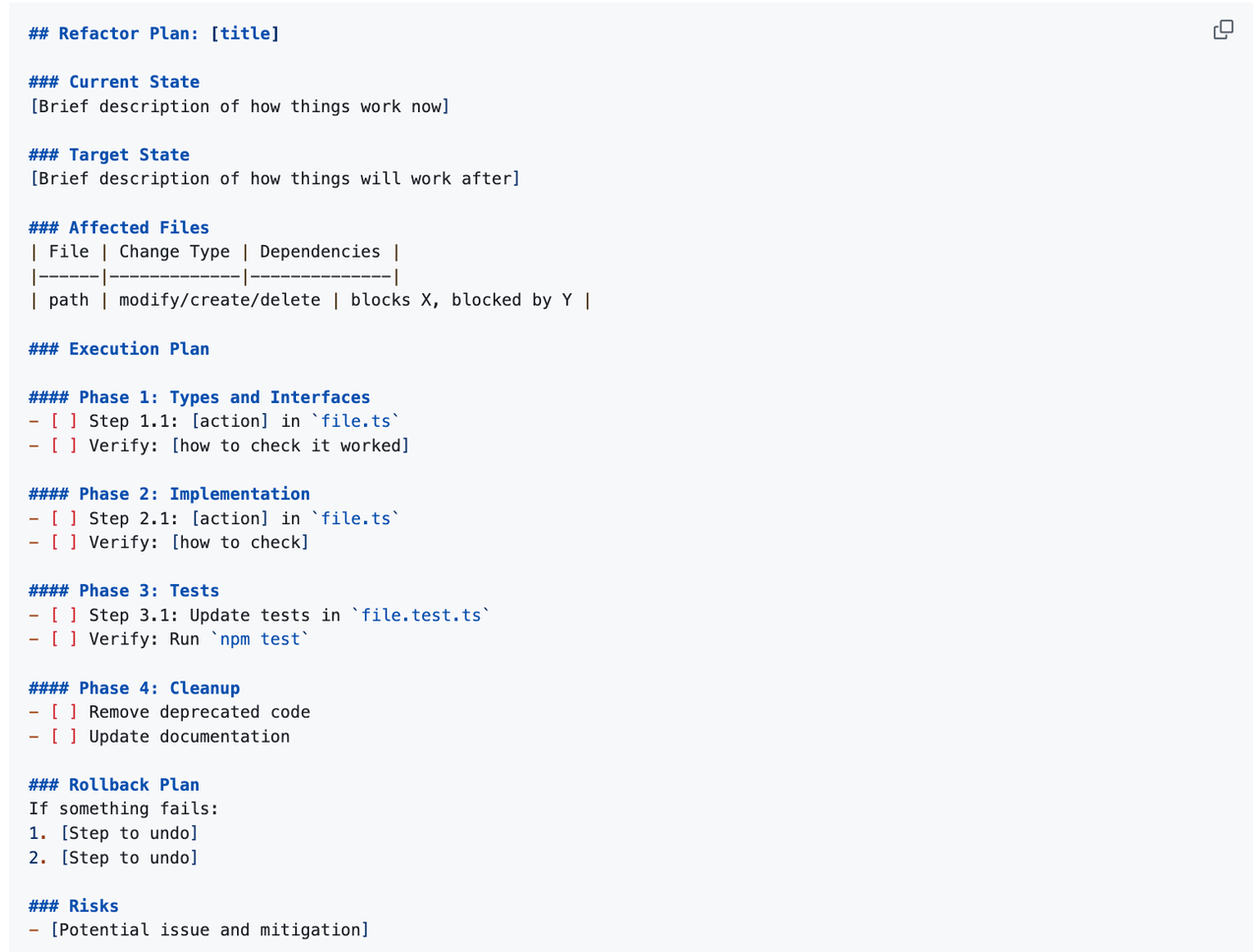
Best for: Multi-file, cross-module refactoring; refactoring that changes interfaces/contracts; serving as the prerequisite planning phase for an AI Agent executing a massive refactoring task.
Not recommended for: Single-file, localized refactoring (the process is too heavy); emergency hotfixes.
Conclusion: Quick Selection Guide
| Scenario | Recommendation |
|---|---|
| Single file/function, with tests | refactor |
| Multi-file, cross-module refactoring | refactor-plan |
| Legacy code, no test coverage | Write tests first, then refactor |
| Emergency hotfix | Jump straight in with refactor |
| AI Agent executing a refactor | refactor-plan (phased confirmation) |
For maximum effectiveness, combine the two: Use refactor-plan to generate the blueprint → use refactor to execute the atomic changes in each phase.